Posts

Showing posts with the label abap

WBS Replication Gaps Between SAP SuccessFactors Employee Central & SAP HANA

  The Problem: WBS Elements Get Lost in Translation During Employee Replication Organizations running SAP SuccessFactors Employee Central (EC) alongside SAP ECP (Employee Central Payroll) or an on-premise HR/PS backend often hit a familiar wall: cost distribution data captured in EC does not always land cleanly in Infotype 0027 (Cost Distribution) on the payroll side. Specifically, the WBS Element (Work Breakdown Structure) value coming from EC is stored as an external, human-readable string, while SAP Project Systems expects the internal PSP number (PSPNR) in field PSP01. Without a bridge between these two formats, replication either fails silently, defaults to blank cost assignments, or requires manual correction after every payroll-relevant employee change. For finance and controlling teams that depend on accurate cost object assignment, this is more than a technical inconvenience. It is a data integrity risk. Where the Gap Actually Lives During Employee Central to Emplo...

USER EXITS - Introduction, Importance & How To Find Them - SAP ABAP.

Image
User Exits are possibilities offered by SAP at strategic moments to add additional functions to the SAP standard or to enhance the standard functionality. User Exits are available for SD Module Only. User Exits starts with the keyword USEREXIT_. User exits are basically bundled in an include program. Programs with user exits contain subroutine calls at certain points in their syntax that are identified by the prefix USEREXIT. This is where customers can include any changes (enhancements) that they want to make to the system. Finding User Exits In SD Module: Go To Object Navigator (SE80) Select PACKAGE and type VMOD & Press Enter. You can find a list of user exit available for SD Module. Includes like MV45AFZZ, MV50AFZZ, MV50AFZ1, RV60AFZZ , etc…. are the most frequently used ones in SD module. For example, Check MV45AFZZ include program. This include contain user exits of SD module. Some of the User Exits Available in this include are: USEREXIT_FI...

Sample Program On AT SELECTION-SCREEN ON HELP REQUEST FOR field- 1.

Image
REPORT ztest. PARAMETERS: field1 TYPE ztest_struct-zfield1, field2 TYPE ztest_struct-zfield2. AT SELECTION-SCREEN ON HELP-REQUEST FOR field1. CALL FUNCTION ' HELP_OBJECT_SHOW_FOR_FIELD ' EXPORTING doklangu = sy-langu doktitle = text-001 called_for_tab = 'ZTEST_STRUCT' called_for_field = 'ZFIELD1'. IF sy-subrc <> 0. MESSAGE ID sy-msgid TYPE sy-msgty NUMBER sy-msgno WITH sy-msgv1 sy-msgv2 sy-msgv3 sy-msgv4. ENDIF. AT SELECTION-SCREEN ON HELP-REQUEST FOR field2. CALL FUNCTION ' HELP_OBJECT_SHOW_FOR_FIELD ' EXPORTING doklangu = sy-langu doktitle = text-001 called_for_tab = 'ZTEST_STRUCT' called_for_field = 'ZFIELD2'. IF sy-subrc <> 0.    MESSAGE ID sy-msgid TYPE sy-msgty NUMBER sy-msgno    WITH sy-msgv1 sy-msgv2 sy-msgv3 sy-msgv4. ENDIF. For This Program a structure was created: OUTPUT: On pressing "F1" button on field1 , ...

ABAP Events - AT SELECTION-SCREEN ON field - Introduction With Sample Program.

Image
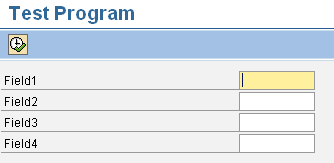
AT SELECTION-SCREEN ON <field> Event With A Sample Program This event can be used if the user wants checks or validations to be carried out for a particular field on the selection screen. At Selection-Screen On <field> and At Selection-Screen events , both do the same job i.e. validating the input fields present on the selection screen. The only difference is At Selection-screen event is used to validate all the fields on the selection screen where as At Selection-Screen On <field> event is used to validate a particular field in the selection screen. Suppose there are 4 input fields in the selection screen, we want validation for input field FIELD1 only. Using AT-SELECTION-SCREEN ON <field>: REPORT ztest. PARAMETERS: p_field1 TYPE char10, p_field2 TYPE char10, p_field3 TYPE char10, p_field4 TYPE char10. AT SELECTION-SCREEN ON p_field1. IF p_field1 IS INITIAL. MESSAGE 'Please enter a value in Field1.' TYPE 'E'. ENDIF. ...