Posts

Showing posts with the label events

ABAP Events - AT SELECTION-SCREEN ON field - Introduction With Sample Program.
Image
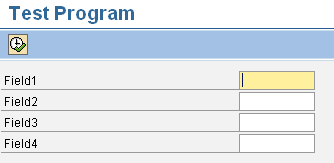
AT SELECTION-SCREEN ON <field> Event With A Sample Program This event can be used if the user wants checks or validations to be carried out for a particular field on the selection screen. At Selection-Screen On <field> and At Selection-Screen events , both do the same job i.e. validating the input fields present on the selection screen. The only difference is At Selection-screen event is used to validate all the fields on the selection screen where as At Selection-Screen On <field> event is used to validate a particular field in the selection screen. Suppose there are 4 input fields in the selection screen, we want validation for input field FIELD1 only. Using AT-SELECTION-SCREEN ON <field>: REPORT ztest. PARAMETERS: p_field1 TYPE char10, p_field2 TYPE char10, p_field3 TYPE char10, p_field4 TYPE char10. AT SELECTION-SCREEN ON p_field1. IF p_field1 IS INITIAL. MESSAGE 'Please enter a value in Field1.' TYPE 'E'. ENDIF. ...

ABAP Events - AT SELECTION-SCREEN OUTPUT Keyword, Example With Output.

Image
All About AT SELECTION-SCREEN OUTPUT Event With A Sample Code. This event gets triggered at the PBO of the selection screen every time the user presses “ENTER” button on the selection screen. In simple words, this event is triggered after loading the selection screen into memory but before it is displayed to the user. This event can be used to change the properties of the selection screen fields dynamically. Hence this event allows us to modify the selection screen and its fields directly before it is displayed. Attributes related to any selection screen fields are saved in a workarea called SCREEN during this event. In case you try to use two or more AT SELECTION-SCREEN OUTPUT events, you will get an error message “The event AT SELECTION-SCREEN OUTPUT was already specified in the program.” For example, if you select some radiobutton in the selection screen then you want some of the fields should become invisible or grayed out. Such scenarios can be achieved by using thi...