Posts

SAP ABAP - Sample Report Program Used To Find BAPI's.
Image
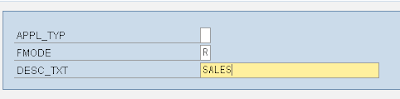
This is a sample report program for searching BAPI's. This Report Program will search for all the remote or local BAPI , based on the description text . Say for example, If we require customer related or sales related BAPI'S, then we need to put sales or customer in the description fieldand it will display the list of the related BAPI's. SAMPLE PROGRAM: REPORT ztest_find_bapi. TYPES : BEGIN OF ty_tfdir, funcname TYPE rs38l_fnam, END OF ty_tfdir. TYPES : BEGIN OF ty_tftit, funcname TYPE rs38l_fnam, stext TYPE rs38l_ftxt, END OF ty_tftit. DATA : it_tfdir TYPE STANDARD TABLE OF ty_tfdir, wa_tfdir TYPE ty_tfdir, it_tftit TYPE STANDARD TABLE OF ty_tftit, wa_tftit TYPE ty_tftit. DATA : ws_bapi TYPE char4, chk TYPE char1, field1(30). DATA : ws_lines TYPE i. SELECTION-SCREEN BEGIN OF BLOCK b1 WITH FRAME. PARAMETERS: appl_typ TYPE rs38l_appl, fmode TYPE fmode DEFAULT 'R', desc_txt TYPE char30 OBLIGATORY. SELECTION-SCREEN END OF BLOCK b1. S...

SAP ABAP - SSCRFIELDS - The Screen Fields Table.

Image
The SSCRFIELDS table is used by the selection screen to store data that can be passed to the program for further processing. Data that can be passed to the program:   FUNCTION CODES : Which can trigger processing in the program.   TEXT : Which will appear on the screen. - The SSCRFIELDS-UCOMM field holds the user defined function code associated with a pushbutton. When the user presses the button present on the selection screen, the program receives a function code which can be used to initialize some kind of processing. - The SSCRFIELDS-FROM _TEXT / TO_TEXT field holds the text associated with the FROM & TO range. - The SSCRFIELDS-FUNCTXT_01 - 05   fields hold the text associated with the pushbuttons on the application toolbar. ALSO READ: - ELEMENTARY DATA TYPES - Initial Values, Syntax & Properties. - FIELD SYMBOLS - Introduction, Syntax & Examples. - PARAMETERS - Introduction, Syntax & Examples. ...

Selection-Screen (SAP ABAP Keyword) Syntax & Examples

Image
INTRODUCTION: - PARAMETERS statement/keyword is used for single field entries in the selection screen. - SELECT-OPTIONS statement/keyword is used for complex selections. - SELECTION-SCREEN statement/keyword is used for formatting the selection screen. - Programmer gets a great deal of control on how to present the User Interface / Selection Screen to the user. Using the options available with the SELECTION-SCREEN statement, the look of the screen can be formatted as per the requirement. - SELECTION-SCREEN is used to form blocks by combining several PARAMETERS , SELECT-OPTIONS , comments etc. on one line. - The standard selection screen of executable programs is predefined and has screen number 1000 . - A SELECTION-SCREEN block can contain keywords like PARAMETERS , SELECT-OPTIONS , COMMENT, PUSH-BUTTON etc. SYNTAX: 1) SELECTION-SCREEN BEGIN OF LINE. ........... ........... SELECTION-SCREEN END OF LINE. This option is used to have several elements in ...

Parameters - Syntax & Examples (SAP ABAP Keyword).

Image
INTRODUCTION: - The PARAMETERS statement creates a single entry field on the selection screen. - The PARAMETERS command is very simple to use and a powerful means to create a user interface. - In layman terms, PARAMETERS statement is used to accept input from user. It is used when we want the user to enter data and depending upon what he/she enters, necessary action is to be taken. - It creates a variable in the program with the same name and the value placed in the field at run time by the user is also placed in the variable. SYNTAX: PARAMETERS <pname> EXTRAS where <pname> is the variable created which holds the the value entered by user at run time. and EXTRAS are the additional properties associated with the PARAMETERS statement, such as: TYPE type [DECIMALS dec ] LIKE fld OBLIGATORY NO-DISPLAY VISIBLE LENGTH vlen AS CHECKBOX [USER-COMMAND fcode ] RADIOBUTTON GROUP group  [USER-COMMAND fcode ] AS LISTBOX VISIBLE LENGTH vle...

SAP ABAP - Basics - Theory, Examples & Necessary Screenshots.

- ELEMENTARY DATA TYPES - Initial Values, Syntax & Properties. - FIELD SYMBOLS - Introduction, Syntax & Examples. - PARAMETERS - Introduction, Syntax & Examples. - SELECT-OPTIONS - Introduction, Syntax & Examples. - SELECTION-SCREEN - Introduction, Syntax & Examples. - SSCRFIELDS - The Screen Fields Table. Your suggestions and comments are welcome in this section. Please mail all your contributions to administrator@abapmadeeasy.com We request you to mention your Name, Designation, Experience & Organization you are working for. Your posts will be verified and posted in this site with your name.

Select Options - Syntax & Examples (SAP ABAP Keyword)

Image
INTRODUCTION: - The SELECT-OPTIONS statement creates selection criteria for a particular database field. The existence of the statement in the code causes the selection screen to display at the beginning of the report execution. It creates a line on the selection screen where the user can enter selection criteria for that field. - Basically SELECT-OPTIONS statement determines the user interface for any report program. SYNTAX: SELECT-OPTIONS <sel> FOR <f>                                   [DEFAULT <g> [TO <h>]  [OPTION <op>] SIGN <s>]                                   [MEMORY ID <pid>]                                   [LOWER CASE]        ...

Field Symbols - Syntax & Sample Program (SAP ABAP Keyword).

- In SAP, A field symbol can point to any data object. - Field symbols can be created without any attributes or with a type specification . If a field symbol is created without attributes, it takes on the attributes of the field to which it is assigned. If a field symbol is assigned a type specification, the system verifies that the types of the field and field symbol are compatible. - To declare a field symbol in SAP ABAP, use the statement FIELD-SYMBOLS <FS>  [ <type> | STRUCTURE <S>  DEFAULT <WA> ]. Angle brackets (<>) are part of the syntax, which basically allows to distinguish the field symbols from the normal fields in the programs. - The <type>  addition is used to specify the type of a field symbol. If there is no type specification it means the field symbol adopts all of the attributes of the data object. TYPE ANY - Field symbol adopts all of the attributes of the data object. TYPE C, N, P, or X - The ...

SAP ABAP - Elementary Data Types, Initial Values, Syntax & Properties.

In ABAP, we have 8 elementary data types to declare data types: CHARACTER TEXT(C): - Lenght: 1 - 65535. - Default Length: 1. - Initial Value: Blank. - Default Values for the character based data types has to be a text enclosed in single quotes. - Character fields (Type C) are l eft-justified and can be truncated or filled with blanks from the right. - Character fields can also be used as alphanumeric fields. Example: DATA: option TYPE c. DATA: name(30). DATA: subject(20) TYPE c. DATA: title(10) VALUE 'Mr.'. DATA: name(30) TYPE c VALUE 'Sachin Tendulkar '. DATA: name TYPE char30. " This statement will allow name variable to hold upto 30 characters. NUMERIC TEXT (N): - Length: 1 - 65535. - Default Length: 1. - Initial Value: '0....0'. - Numeric text variables hold unsigned positive integers. - This data type should be used for numeric fields t hat will not be calculated like Roll number , Employee number. - We can ...

SAP ABAP - Sample Programs, Tips & Tricks On SAP Script/Smart Forms.

INDEX - SAPSCRIPTS / SMARTFORMS: - Convert Smartform To PDF Document & Mail It To The Concerned As An Attachment. - Downloading Graphics From Any SAPSCRIPTS. SMARTFORMS Interview Questions With Answers: 1.  What Are Smart Forms In SAP System? 2. W hat Are The Differences Between SAP Scripts & Smartforms? 3.  How Many Main Windows Can We Have In A Smartform? 4.  Is It Mandatory To Have A Main Window In Smartforms? 5.  What Are The Types Of Windows Available In Smartforms? 6.  Explain The Significance Of Main Window? 7.  Explain The Significance Of Secondary Window? 8.  Explain The Significance Of Copies Window? 9.   Explain The Significance Of Final Window? 10.  What Is The Difference Between Tables & Template Node? 11.  How To Insert Or Upload Graphics In Smartforms? 12.  Can You Force A Page Break Within Table Loop In Smart Forms? If Yes, How? 13.  How Do You Create & Maintain Font Styl...

SAP ABAP - Sample Programs, Tips & Tricks On Report Programming.

INDEX - REPORT PROGRAMMING: - Finding User Exits, Badi's & Enhancements For Any Transaction Or Program. - Upload Excel Sheet Data Into Internal Table Using FM ALSM_EXCEL_TO_INTERNAL_TABLE. - Uploading Large Data From Excel Sheet To Internal Table Using FM ALSM_EXCEL_TO_INTERNAL_TABLE - BDC To Create Condition Types & Amount For Tcode MEK1. - Type Conversion ( Char To Curr Type). - Type Conversion ( Curr To Char Type). - Send an excel sheet to the concerned person in an email format via SAP System. - Upload the financial documents from a legacy system (excel file) into SAP using transaction code FB01. - Edit / Create Customer Specific Message / Text On Login Screen Via SE61. - MM - Determine Shelf Life Of Materials. - Function Module To Verify Valid E-Mail Address. - Setting Default Values In Selection Screen. - Programming On Buttons In A Screen. - Create A Screen With Two TABSTRIPS For A Report Program. - On Using HOTSPOT Keyword In A Report ...

